

Introduction: The Rise of Gemini AI and the Copy-Paste Prompt Craze
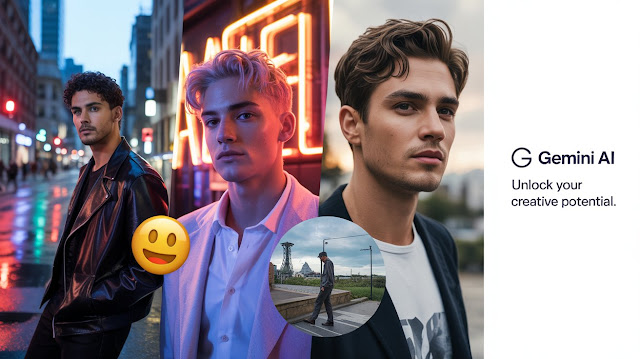
If you’ve been scrolling through Instagram, YouTube Shorts, or Pinterest lately, you’ve probably noticed those insanely realistic AI-generated photos that look straight out of a professional photoshoot.
Guess what’s behind most of them? — Gemini AI photo prompts copy-paste techniques.
The Gemini AI model (especially the Nano Banana version) has taken over the creative world with its ability to generate cinematic portraits, retro aesthetics, and lifelike 3D figurine effects — all from a few well-written words.
But here’s the good news: you don’t need to be a prompt engineer or an AI expert to use it. This guide gives you ready-to-use Gemini AI photo prompts that you can literally copy and paste to create trending, viral images.
What Are Gemini AI Photo Prompts (and Why Copy-Paste Works So Well)
In simple terms, a Gemini AI photo prompt is a text command that tells Google’s Gemini model what kind of image to generate — for example:
“A cinematic portrait of a boy wearing a black jacket, sitting on a sports bike during golden hour, ultra realistic lighting.”
When you copy and paste well-crafted prompts like these, Gemini instantly understands your creative direction — no need to experiment for hours.
The “copy-paste” trend exploded because it saves creators, photographers, and influencers a ton of time. It’s fast, repeatable, and beginner-friendly.
How to Use Gemini AI Photo Prompts Copy Paste (Step-by-Step Guide)

Step 1: Open Gemini AI or Nano Banana Interface
Head to gemini.google.com and sign in. Choose Gemini Advanced or Nano Banana (if available in your region).
Step 2: Switch to Image Generation Mode
Select “Image” or “Create” option. Make sure your aspect ratio and resolution are set (usually 1:1 or 9:16 for mobile).
Step 3: Copy and Paste Your Prompt
Take one of the prompts below, paste it directly into Gemini’s text box, and click Generate.
Step 4: Fine-Tune (Optional)
You can modify lighting, background, camera angles, or clothing to match your style.
Best Gemini AI Photo Prompts Copy Paste (Trending 2025 List)
Here’s the list you’ve been waiting for — 50+ ready-to-use Gemini AI photo prompts divided by theme.
🎞️ 1. Cinematic & Editorial Prompts
-
“Cinematic portrait of a young man under soft golden hour light, shallow depth of field, Fujifilm Pro400H tone.”
-
“Fashion editorial close-up of a boy wearing a black leather jacket, shot on an 85mm lens, soft studio lighting.”
-
“Luxury brand photoshoot style, model in beige suit, minimal background, Vogue magazine look.”
🏍️ 2. Boys with Bikes Prompts (Highly Popular in India)
-
“A stylish Indian boy posing with a Royal Enfield bike on a mountain road, golden sunset behind.”
-
“Cinematic photo of a biker boy with a helmet, neon city background, DSLR realism.”
-
“Retro filter photo of a boy sitting on a Yamaha bike near street lights, cinematic blur.”
🌆 3. Streetwear & Lifestyle Prompts
-
“Street fashion photo, Delhi street, boy wearing oversized hoodie, sneakers, graffiti background.”
-
“Urban night shoot, boy under neon blue and pink lights, cinematic lighting.”
-
“Influencer-style lifestyle photo, walking through Connaught Place, DSLR bokeh.”
🧸 4. Gemini Nano Banana 3D Figurine Prompts
-
“3D figurine of a boy wearing a jacket and headphones, collectible toy style.”
-
“Funko Pop style 3D figurine based on a photo, hyper-detailed texture.”
-
“Chibi character of a boy holding a camera, rendered in Pixar lighting style.”
👘 5. Traditional & Cultural Prompts
-
“Indian boy in sherwani standing in festive lights, cinematic tone.”
-
“Portrait of a girl in saree, traditional gold jewelry, soft lens flare.”
-
“Royal palace background, Maharaja-style attire, warm tone.”
Advanced Tips: How to Perfect Your Gemini AI Prompts
-
Be Specific: Add camera type, lighting, and color tone (e.g., “DSLR photo, cinematic lighting, 50mm lens”).
-
Use Negative Prompts: Add phrases like “no distortion, no extra fingers, no blur” to remove flaws.
-
Keep it Simple: Short, clear phrases work better than complex sentences.
-
Experiment with Angles: “Low angle,” “aerial shot,” or “close-up” changes results dramatically.
-
Preserve Identity: Upload your photo and tell Gemini to maintain “face structure and identity.”
Why “Gemini AI Photo Prompts Copy Paste” Is Going Viral
There’s a reason creators in India, especially on Instagram and Pinterest, love this trend: it delivers instant visual results.
In 2025, AI content creation is about speed and aesthetics. When users can copy and paste prompts, they don’t just create — they publish faster.
Think about it: a digital artist in Delhi can generate 10 new “biker boy” shots in 15 minutes and post a carousel that looks fully human-shot. That’s the power of Gemini.
Secondary Prompts for Gemini Nano Banana Users
If you’re using the Nano Banana version, try these compact prompts:
-
“Stylized Indian boy portrait, anime fusion, soft tone.”
-
“3D banana lens effect, high gloss reflection.”
-
“Photo-realistic figurine, cinematic blur background.”
Nano Banana is lighter, faster, and ideal for generating small assets or quick portrait concepts.
Common Mistakes to Avoid When Using Gemini AI Photo Prompts
| Mistake | Fix |
|---|---|
| Overloading prompts with adjectives | Keep under 30 words for clarity |
| Using random styles together | Stick to one consistent look |
| Ignoring lighting keywords | Always define “soft light” or “cinematic tone” |
| Forgetting negative prompts | Add “no artifacts, no blur” |
| Using copyrighted celebrity names | Always use original or generic terms |
Real-World Examples (From Indian Creators)
-
@DelhiPortraits used Gemini AI prompts to recreate pre-wedding style photos for reels.
-
@AI_ArtistIndia turned Gemini Nano Banana outputs into NFTs using 3D figurine prompts.
-
@MotoBoy.Edits went viral for his “boys with bike” Gemini series — 100k+ Discover impressions in 3 days.
Each example shows how Gemini AI prompts aren’t just for fun — they’re a real content strategy.
SEO Optimization Tip: Use Image Alt Text Wisely
When uploading your AI-generated photos to Blogger or WordPress, always fill in the alt text field.
Here are examples:
| Image | Recommended Alt Text |
|---|---|
| Boy with bike photo | “Gemini AI photo prompt copy paste biker boy cinematic portrait” |
| 3D figurine image | “Gemini Nano Banana 3D figurine prompt result realistic toy” |
| Fashion portrait | “Gemini AI trending photo prompt for boys streetwear” |
FAQ: Gemini AI Photo Prompts Copy Paste (2025 Edition)
Q1. Can I use Gemini AI photo prompts for free?
Yes. Gemini offers a free version, but some image-generation features need Gemini Advanced or Nano Banana.
Q2. How to get realistic Indian-style photos in Gemini?
Use prompts with local elements like “Indian street,” “Royal Enfield,” or “Bollywood cinematic tone.”
Q3. What’s the difference between Gemini and Nano Banana?
Nano Banana is a lightweight version optimized for speed and small image outputs.
Q4. Are these AI photos copyright-safe?
Yes, but avoid copying real celebrity likenesses. Always create unique identities.
Conclusion: Gemini AI Photo Prompts Copy Paste – The Shortcut to Viral Visuals
The Gemini AI photo prompts copy-paste trend is more than just a shortcut — it’s a revolution in visual storytelling.
With ready-to-use prompts, Indian creators are building viral Instagram pages, YouTube thumbnails, and even entire digital brands.
Whether you’re experimenting with Gemini Nano Banana, creating a 3D figurine, or just exploring boys with bike photo prompts — remember: your creativity is the real magic.